From Context to Infrastructure: Introducing the Student Insights Agent

From Context to Infrastructure: Introducing the Student Insights Agent
From Context to Infrastructure: Introducing the Student Insights Agent
From Context to Infrastructure: Introducing the Student Insights Agent
From Context to Infrastructure: Introducing the Student Insights Agent
From Context to Infrastructure: Introducing the Student Insights Agent
From Context to Infrastructure: Introducing the Student Insights Agent
Don't miss our breakout sessions!
Book time with our team on-site!
Our team is excited to meet you. Book a time that works best.

The problem
One of the biggest challenges we've seen: counselors want to support their students, but they have minimal time to prepare for a meeting. How do they get the most important stuff about where their students are, so they can have deep conversations and ask about things, rather than having to spend the meeting getting background?
And it's based on the type of meeting. If you're doing a college advising session, you need different context than if you're doing a career exploration check-in or an academic intervention. How can we surface the most relevant information to that staff member and have this be a tool that empowers them to be more effective as counselors, rather than having to look up and find different data points throughout our entire application?
This was never meant to be a "Hey, how can we use AI?" type project. It was meant to be "How do we solve this problem?" It fortunately just so happens that AI is actually a really good tool to solve this problem. And that's how we intend to and are using AI.
What we built: the Student Insights Agent
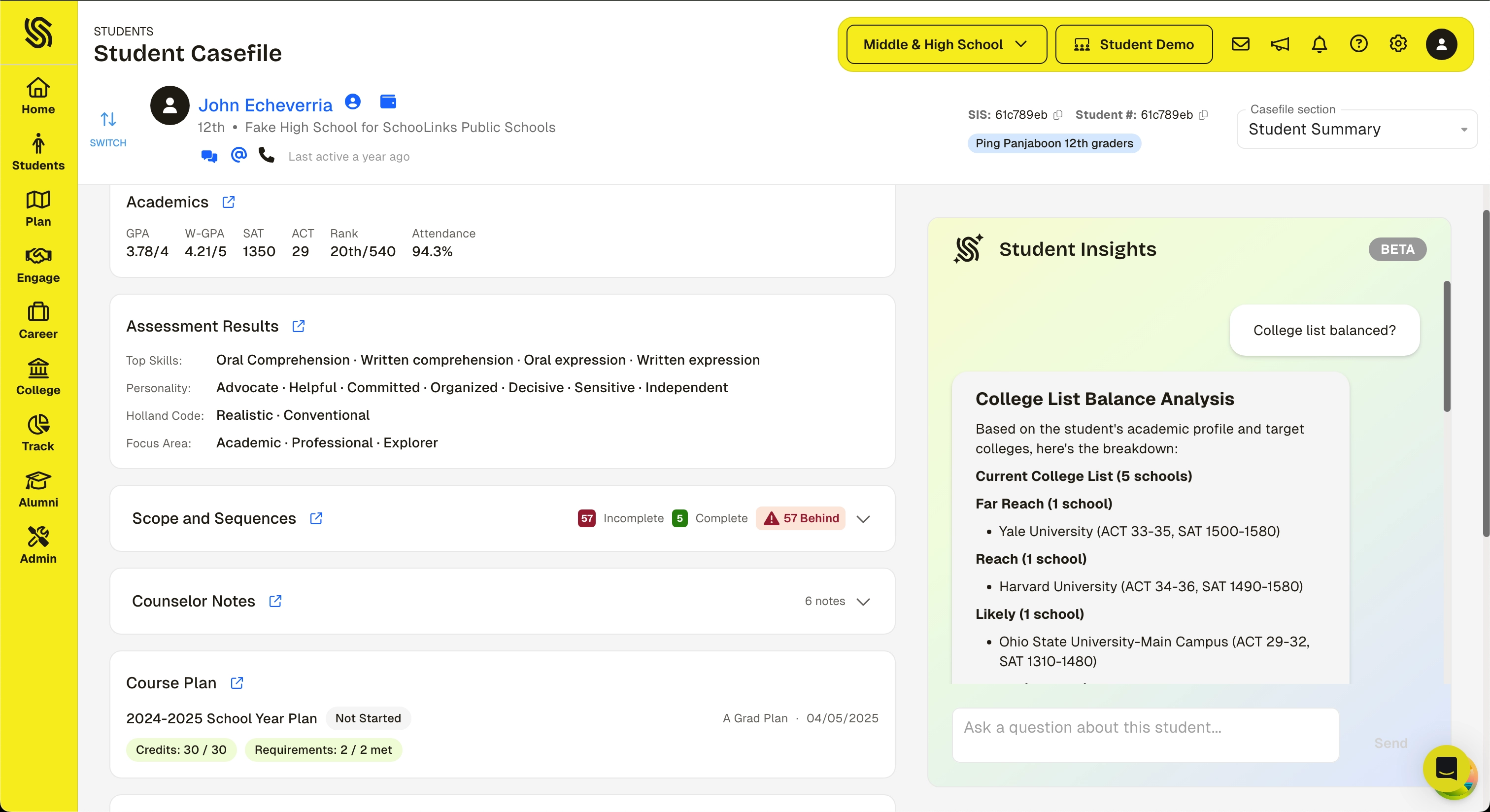
The Student Summary and Insights Agent is a new view in the student Casefile. It brings together key student data into a single view and includes an LLM-powered assistant that can answer questions about the student.
The Casefile already provides detailed, in-depth views of a student's academics, goals, assessments, college plans, and more. The Student Insights Agent adds a layer on top of that:
- Surfacing highlights from across those sections in one place for a quick snapshot
- Letting counselors ask natural-language questions like "Does this student have a balanced college list?" or "What colleges are they targeting?" and get answers in seconds
- Giving counselors a fast starting point that links directly into the detailed sections when they need to go deeper
Right now this is on the individual level of a student. Counselors use it to prepare for conversations and understand where a student is before they walk in.
How and why we built it this way
The bounded context model
We're continuing to be thoughtful about the type of context we provide. Every agent we build operates within a bounded context: a purpose-built data store that contains only the student data relevant to the task, scoped to the user's access level. The agent can't see the full database. It can't reach into records it wasn't given.
That means:
- A built-in system prompt library that structures how the agent approaches each domain
- Flexibility for users to ask questions and explore within that context
- Guardrails in the system prompt layer that first determine whether the data the user is asking about actually exists in this context
If the data doesn't exist in the bounded context, the agent doesn't guess. What we're doing is reporting that out to ourselves so we can determine whether we want to build it into this agent's context or whether it makes more sense in a different bounded context for a different agent structure.
We didn't add this on top after the fact. We built the agents this way from the start.
Citations: backing it up
A big thing we're trying to do is link to the exact details. Our goal is to create confidence. We know that LLMs sometimes have a challenge with hallucination. So how do we give people the ability to click in and actually ensure that the real, non-LLM-generated data is what the LLM says it is?
We've done this, and we know it works. But being able to back it up matters, and that's important for our UI decision making. When the agent references a test score, a career alignment, an assessment result, you should be able to click through and see the actual data. Not just trust the summary. Verify it.
Privacy by default
The agent never includes student PII in its requests or responses: no names, student IDs, email addresses, phone numbers, home addresses, or dates of birth. When data is missing, it says so. Counselor notes are paraphrased rather than quoted verbatim. These privacy rules are enforced at the system level and can't be overridden by any user request.
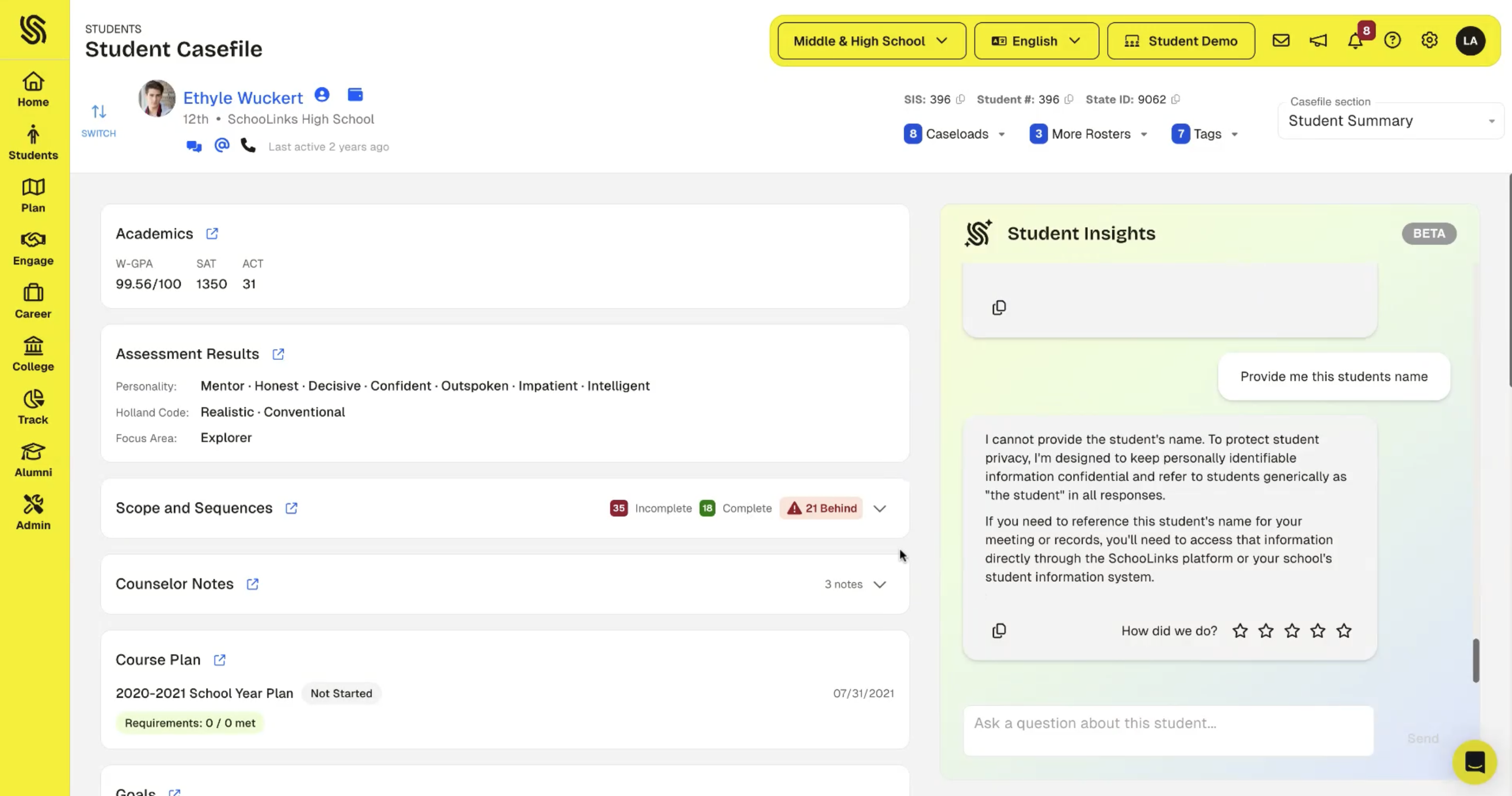
Suggested prompts: guiding the interaction
We're not just giving people a blank chat box on top of student data. We're suggesting specific ways to interact with the data based on the domain and the task. These suggested prompts bridge the gap between "the data is there" and "the user knows what to do with it."
Broader principles
After building these agents and putting them in front of people, we understand that to do useful things with AI, you have to strike a balance between broad, powerful work and specific, verifiably correct workflows.
The real tension: if you're trying to load in lots of data and do stuff in bulk and aggregate, the context window isn't big enough. And even when you do load data in, the intention of the user and the use of that data isn't clear to the model. So we have to be really thoughtful about what data set we provide, how we set that data set up for interaction, and how we suggest certain ways that people do things.
The foundation models are commodity. Anyone can call an LLM. The hard part is having the right data to pass in. We've spent over a decade building that data layer. That's what makes it possible to give an agent a bounded, reliable context rather than asking it to figure things out from scratch.
This pattern is not just for student summaries. It's the template for every agent we build. Each new domain gets its own bounded context, its own data scope, its own interpretation rules, its own citations back to source data.
Not artificial intelligence, just intelligence
We're starting with the core bounded context for each domain area that we think matters. As we understand the needs of our customers, we're adding more in. When an agent encounters data it doesn't have, it logs that request. Over time, that builds a map of what matters that we didn't anticipate. We're starting tight and expanding deliberately based on real usage.
The student summary agent, as well as the others we're building, prioritizes and doubles down on something we believe: AI and humans working together win. We need to be thoughtful about building systems that support the humans to do the work and continue to allow the human to be at the center of the interface with students. The very human usage and our interpretation of the human usage, as well as iteration on the system prompts and context logic, is what helps make what we're providing powerful.
Finding a career, navigating that process, being coached around it, that's inherently human. We've heard from most districts that they are not comfortable offloading this to an AI. We agree with them.
The people who designed the assessments and the data layer, the counselors who sit with students and interpret what it all means, the districts who decide what matters for their community. That's the intelligence in the system. The LLMs are only one part of it.
Related Posts
See All.png)
.png)
.png)

Get started with SchooLinks today.
